NEWFlow-graph pipelines · triggers · message nodes→
Agents that ship
inside your repo.
Design the pipeline your agents run · phase by phase, wired as a graph. Assign a ticket, watch an agent open the PR, inside your branch protection, your reviewers, your stack.
Any
phases you author
phases you author
1
pinned live version
pinned live version
Runs in your ecosystem
GITHUB
BITBUCKET
JIRA
SLACK
CI
MCP
—— THE PIPELINE
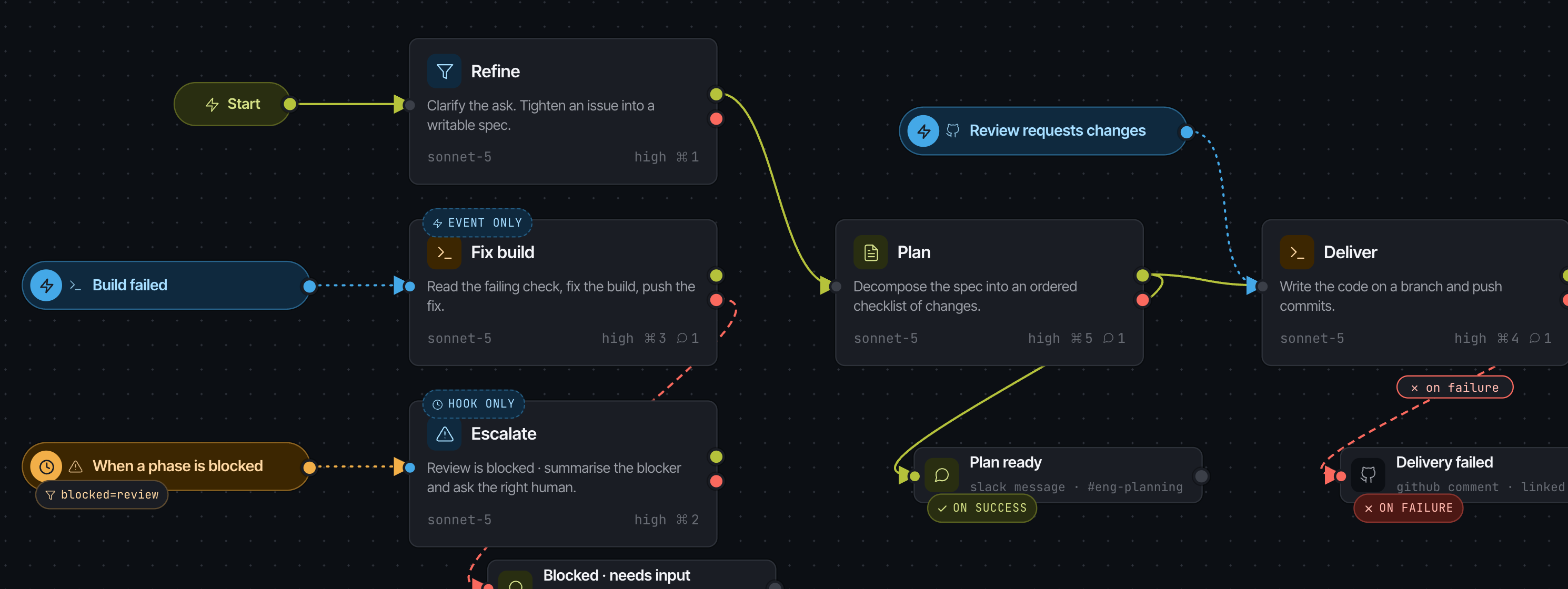
A pipeline is a graph,
not a template.
Write the phases yourself · each one a system prompt plus its model, effort and allowed tools. Wire success and failure paths, start a phase from a CI or review event, end a line with a message to Slack or the PR.
—— THE PLATFORM
You design the pipeline.
Agents walk it.
01
Phase design
Custom phases wired as a graph · failure paths, branches, capped loops.
02
Triggers
Start a phase from a CI, GitHub, Jira or Slack event, or a lifecycle hook.
03
Persona
How an agent behaves, written per phase and bound to a design.
04
Messaging
Reusable templates that fire on a success or failure edge.
05
Versions
Pin one live version. Test a draft on a real run, then promote it.
06
Runs
Every run on one board, with spend and tokens per card.
07
Environments
Repo scope, run limits and a hard USD cap on every context.
08
Governance
Approved tools, scoped keys, roles, audit log.
—— FIRST PR IN AN AFTERNOON
01
Connect
Point AgentSDE at GitHub or Bitbucket and your tracker. Scopes stay as your OAuth grant set them.
02
Design
Start from a preset pipeline or write your own phases, then pin a version live.
03
Hire
Give an agent a design, a persona and an environment. It picks up the next issue itself.
—— PRICING
Pay per seat, not per token.
Starter
For teams kicking the tires.
$0forever
Start free✓1 connected repo
✓25 agent runs / mo
✓One phase design
✓GitHub only
MOST TEAMS
Team
For shipping teams.
$49per dev / mo
Start 14-day trial✓Unlimited repos
✓Unlimited agent runs
✓Custom phase designs, personas and messaging
✓Environments with spend caps
✓Roles and audit log
Enterprise
For regulated stacks.
Customtalk to us
—— FAQ
Questions, before
you ship.
Where do the agents actually run?+
On your own machine. Install the AgentSDE Connect daemon on a laptop, build box or server and pair it once, and phases run there, with the code, credentials and model calls staying on that machine.
Can an agent merge its own PR?+
Never by default. Agents open PRs; your CODEOWNERS and branch protections still decide. What an agent may touch is set by its environment · repo scope, a run limit and a hard spend cap.
Do we have to use your pipeline?+
There isn't one. You write the phases · each is a system prompt plus its model, reasoning effort and allowed tools · and wire them into a graph with success and failure paths, branches and capped loops. The five-phase engineering loop is just the preset most teams start from.
How do we change a pipeline safely?+
Designs are versioned as a unit and one version is pinned live. Test a draft with a real run in a non-production environment, compare it to the live run on outcome, cost and duration, then pin it. A design with a live version can't be deleted.
What happens when an agent gets stuck?+
You decide, in the design. A lifecycle hook on 'when a phase is blocked' can start an Escalate phase that summarises the blocker and messages the right human in Slack or on the issue · the run keeps its full trace either way.
Can agents use our internal tools?+
Through MCP. Add your server over HTTP, SSE or local stdio, approve the tools it exposes, and they appear as allowed-tool checkboxes on a phase. Newly discovered tools arrive unapproved, so a server can never widen what a live phase does on its own.
$ agentsde init